// schools — government, catholic & independent
The school website your office can actually keep current.
Notices, term dates, the news page and the newsletter — updated by whoever is on the front desk, in about the time it takes to write the email you would otherwise have sent your web company. And the articles that get a family to choose you are written for you in the background.
Business manager instead of principal? Privacy, hosting & procurement answers
Website, content and hosting on one monthly price · see pricing
Notice
Wednesday assembly moved to 2:15pm — hall in use for the concert rehearsal
Newsletter
Ready
Data held in
Australia
A family decides about your school before they ever visit it.
They search, they land on your site, and they read whatever is there. Too often that is last year's term dates, a news page that stops in 2023, and a photo of a building that has since been rebuilt — not because anyone stopped caring, but because changing a line means emailing someone external and waiting. The site drifts out of date at exactly the speed the office gets busy, which is to say quickly.
// how it works
Updating the site becomes an office job, not an IT project.
The office updates it, not a developer
A closure notice, a changed assembly time, next term’s dates — typed in and live in about two minutes, by whoever is on the front desk. No ticket, no invoice, no waiting until Thursday.
The newsletter and the site stop being two jobs
Notices, calendar and news live in one place, so the newsletter is assembled from what you have already published rather than rebuilt from scratch every fortnight.
The writing that never gets done, gets done
Articles in your school’s voice — the programs, the excursions, the things that make a family choose you — plus social posts, published on a schedule instead of whenever someone finds an hour.
You can see whether it worked
Which pages families actually read, what they searched to land on you, and how the site looks to Google and AI answer engines. Enrolment marketing you can point at, not guess at.
// the actual screen
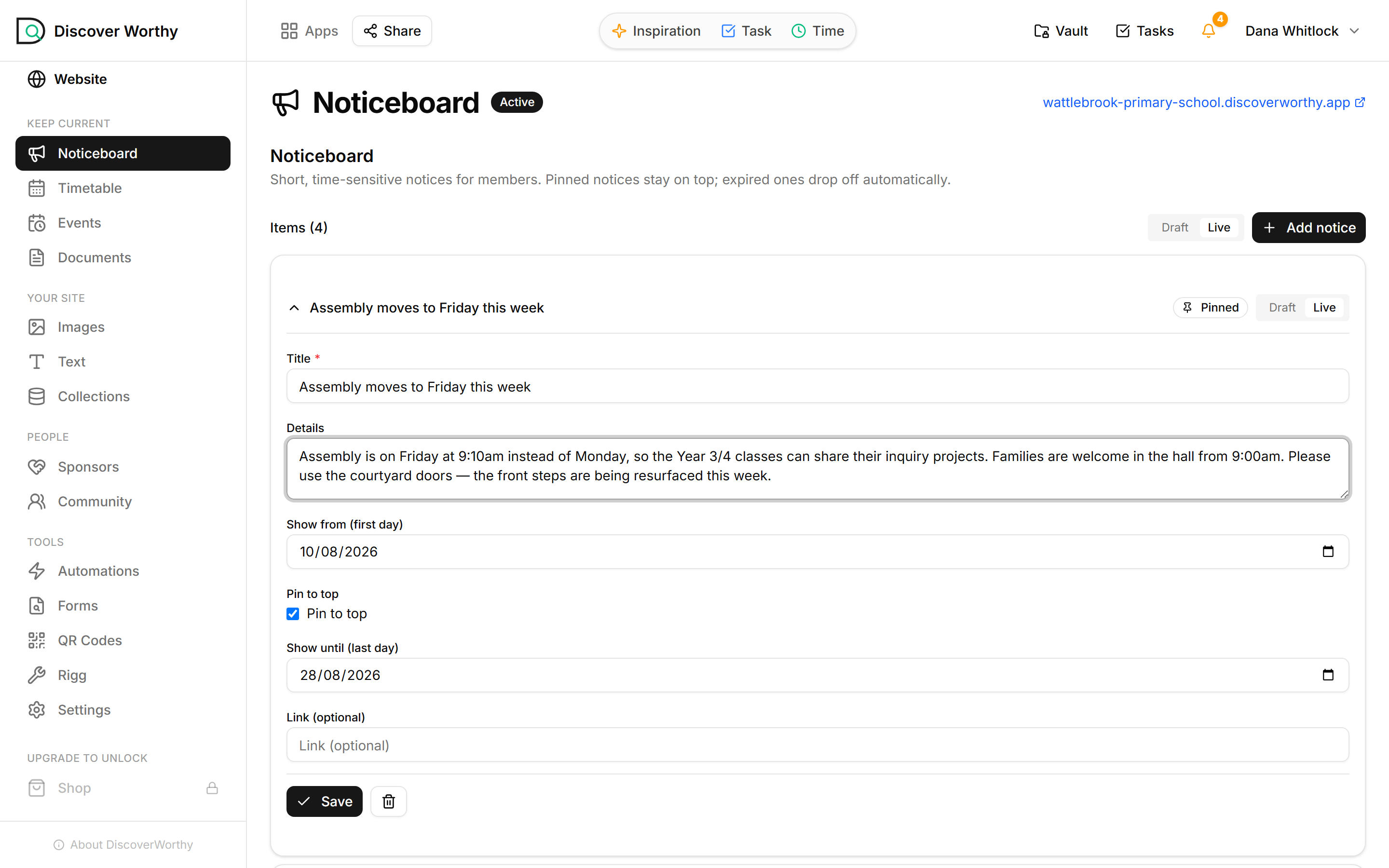
This is the whole job. Type it, save it, it's live.
Not a mock-up — the noticeboard for a real (invented) primary school. A title, the details, the dates it should appear between. Nobody had to know anything about websites to write it.
// the actual screen
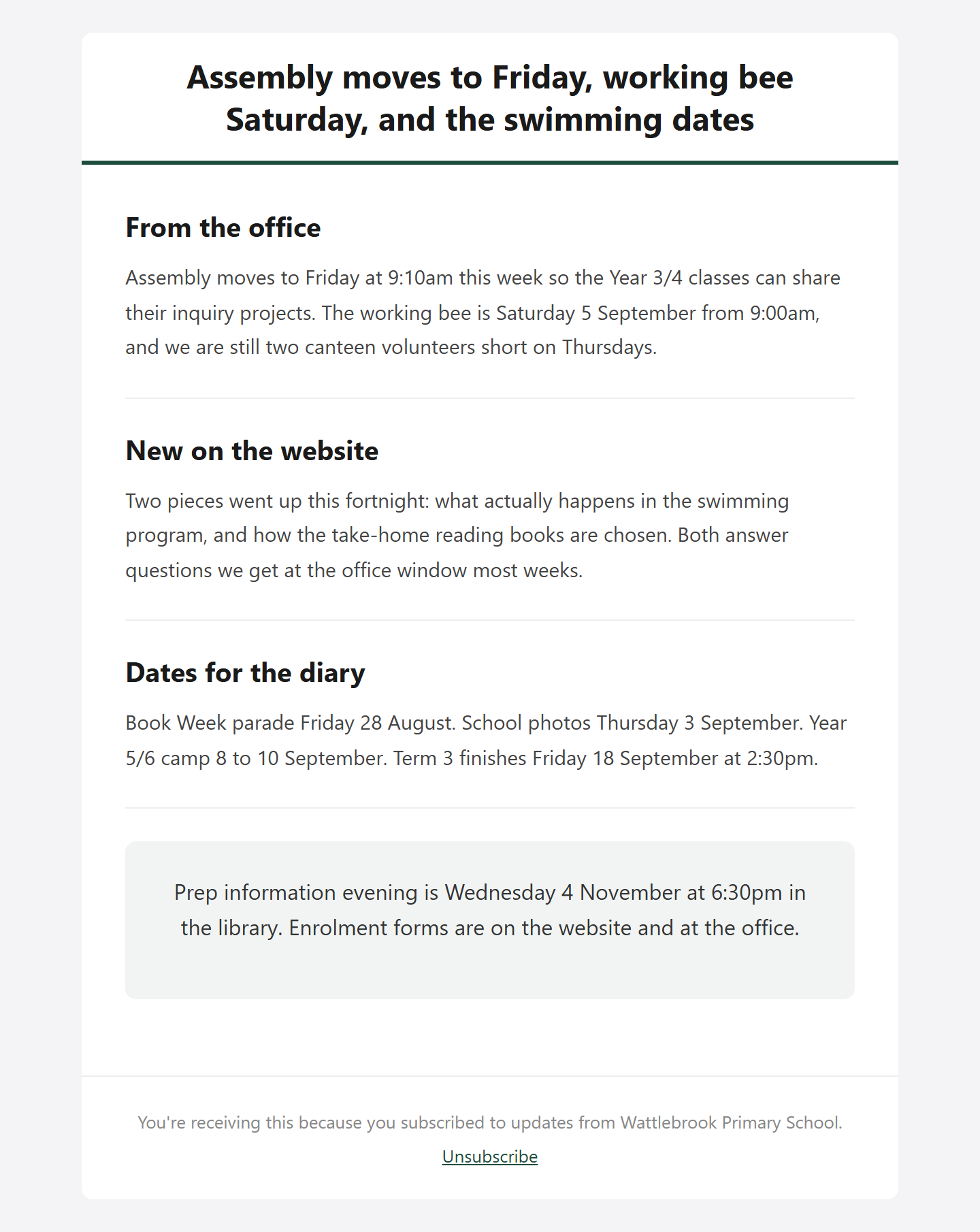
And it's already in the newsletter.
Nobody retyped that assembly change. The fortnightly email is built from what the office has already published — the notices, the articles that went up, the dates in the calendar — so writing it is reading it over rather than starting it.
// inside
Everything the office was doing in four systems.
Your student information system stays where it is — this does not replace it, and it does not need it. The member register is there if you want a community list you control (alumni, families, a program cohort), and it stays switched off until you use it.
// the actual screen
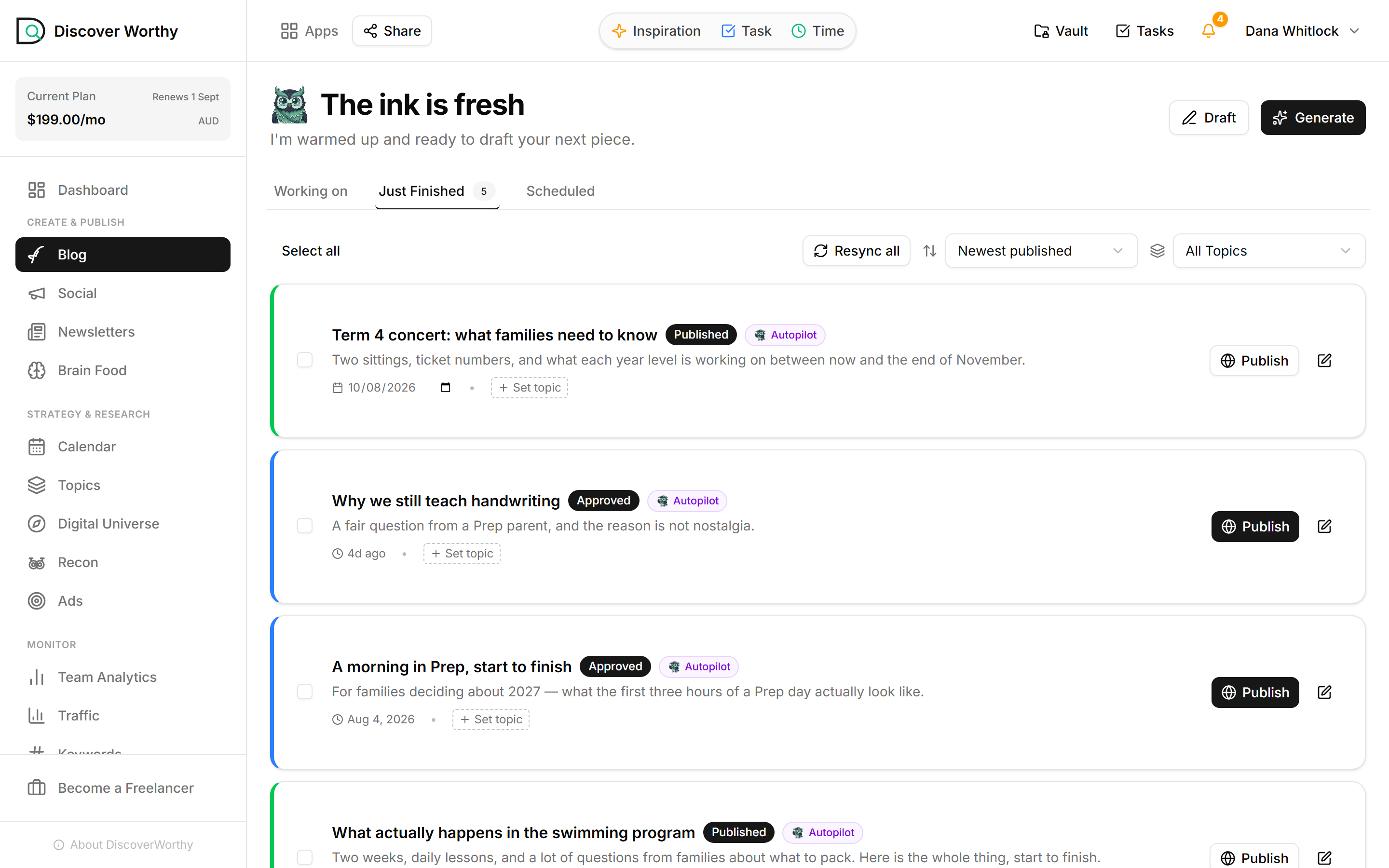
The articles a school never gets around to, already written.
The writing queue for the same school — drafted in its own voice, waiting on a staff member to read it and press publish. These are the pieces a family reads when they are deciding, and the ones nobody on staff has a spare hour for.
// vs. your current web provider
The difference is who can change it on a Tuesday.
Most school sites are built well and then maintained badly — not by a bad provider, but by an arrangement where every edit has to leave the building. This is built so it never has to.
// the actual screen
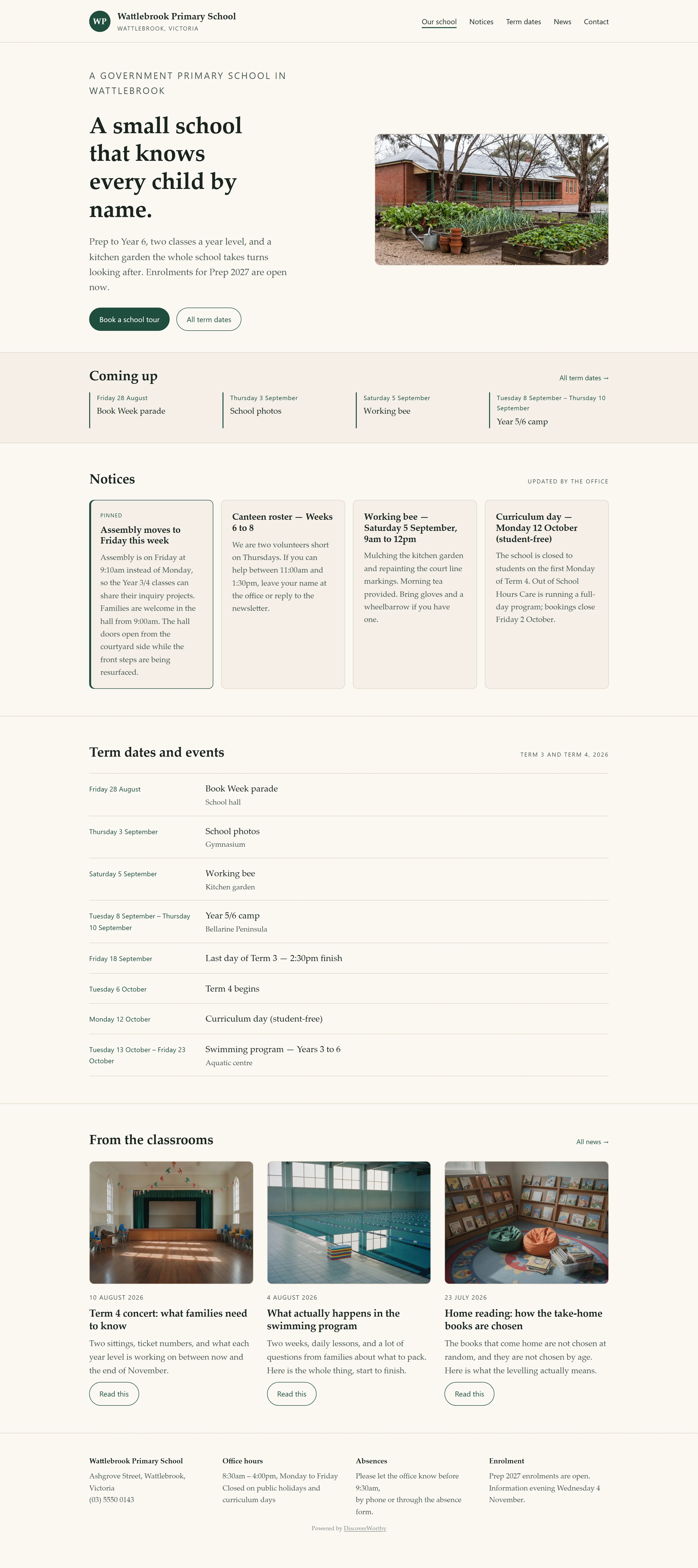
And this is what a family lands on.
The same notice, the same term dates, published. One school site, kept current from the front desk — notices, what's coming up, the full term calendar, and the news that tells a family what the place is actually like.
// for your business manager
Privacy, hosting and procurement — answered up front.
Your school completes its own Privacy Impact Assessment. Almost nobody wants to chase a vendor for the inputs, so the vendor half is written down here rather than waiting behind an email — where the data lives, what is collected, who can see it, how it is destroyed.
Data hosted in
Student data
Sold to third parties
// written against your state's framework
// data residency
Where your data actually lives.
Every production system that stores or processes school data runs in Microsoft Azure, Australia East (Sydney): the database, file storage, the application servers, and the AI service that drafts content.
One honest exception, because a privacy assessment should not discover it later. Two services used for generating marketing content — writing website copy and producing illustrations — run outside Australia. They receive the business information a school publishes about itself. They do not receive member records, member documents, or anything from the member portal. The full sub-processor list, with what each one does and where it runs, is in the privacy pack.
// student data
Whether this touches student records — the precise answer.
DiscoverWorthy does not require any student data. A school runs it on staff and business information: your website, your notices, your calendar, staff logins, and the content the site publishes. That is how it is used today.
It would be misleading to stop there. The platform includes a member register that can hold student records if a school chooses to use it — including a junior flag, documents attached to a named person, and guardian access so a parent can collect them. Nothing switches that on by itself, and nothing populates it without the school entering the data.
So the accurate position for your PIA is: no student data is collected by default; if you choose to keep student records here, the safeguards below apply and should be assessed.
// safeguarding
If you do keep student records, here is what protects them.
Documents are private, and checked on every request
A document attached to a student is never a public link. The file is served through an authorisation check tied to the person asking — the student, or an adult the school has explicitly authorised. Asking for a document you are not entitled to returns nothing at all. Every download is recorded.
Guardian access is granted by the school, and revocable
A parent cannot add themselves. Only the school can authorise an adult to see a named child's documents, and the record keeps who granted it and when. Withdrawing access is a switch rather than a deletion, so the school can still answer “who could see this, and between which dates?” — the question that actually gets asked.
Consent for a student story is bound to the exact story
If a school publishes a student profile, consent for a junior goes to their guardian — and it is tied to that exact version of the text. Edit the story afterwards and the previous approval no longer authorises it. Consent cannot be obtained on a mild draft and spent on a different one.
// security
How it is protected.
At rest
In transit
Access
Monitoring
Backup and restore run on Azure's managed database backups. We would rather tell you the retention window and recovery objective in writing, against your template, than publish a number here that your assessment then has to verify.
// retention & deletion
Getting your data back, and getting it destroyed.
Your content is yours. Ask and we export it. Ask us to delete and we delete the records — and the files behind them, which is the part worth stating plainly: a document about a named child is destroyed, not merely unlinked from the record that described it.
Data is kept while the account is active and for as long as you ask us to keep it. We do not sell data, we do not share it with advertisers, and we do not train anyone else's models on it.
// compliance
How this lines up with your obligations.
The technical controls are the same wherever you are; the framework you assess them against is not. Victorian government schools sit under the Privacy and Data Protection Act 2014 (Vic) and the Information Privacy Principles; independent and Catholic schools sit under the Privacy Act 1988 (Cth) and the Australian Privacy Principles. Every state has its own page with the right references for your assessment.
On child safety: the school remains the responsible entity. Our part is to make the technical controls support your policy rather than undermine it — access that is granted rather than shared, consent that is recorded and version-bound, and an audit trail that answers who could see what.
We are a software supplier and do not attend your site, so a Working with Children Check is not applicable to the service. If a specific engagement ever changed that, we would tell you before it did.
// questions
What business managers ask first.
Is our data stored in Australia?
Yes — Azure Australia East (Sydney) for the database, files, application and AI processing of member content. Marketing-copy and image generation run offshore and receive only the business information you publish about the school.
Do you handle student data?
Not unless you choose to. The product does not require it, and a school can run entirely on staff and business information. If you use the member register for students, the safeguards above apply.
Does this replace our student information system?
No, and it is not trying to. Enrolments, attendance and reporting stay where they are. This is the public face of the school and the content around it.
Can we get a child safety attestation?
We can put our technical controls in writing against your template. We are a software supplier with no physical access to your school, so a Working with Children Check does not apply to the service itself.
What happens if there is a breach?
We notify you promptly with what we know, what was affected and what we have done, so you can meet your own notification obligations. Systems are monitored continuously and failures alert us rather than waiting to be noticed.
Who else processes our data?
The sub-processor list is in the privacy pack, with what each one does and where it runs. It is short, and we would rather you read it than take a reassurance.
// who you are dealing with
The supplier, on the record.
Entity
Registered address
Privacy contact
Security & incidents
An Australian entity, governed by Australian law, holding your data in Australia — so there is no offshore parent in the chain for your assessment to work through. If your template asks something the pack does not cover, ask us and we will answer it in writing.
// start here
See it with your school's own pages in it.
Book a call and we will scope the move from your current site — and bring the privacy pack with us, so the assessment starts on the same day the conversation does.